What is DCS Mission Planner

DCS Mission Planner is a standalone DCS World flight planning and DTC preparation tool for virtual pilots and flight leads. It combines interactive flight planning, mission data visualization, Data Transfer Cartridge (DTC) configuration and .dtc file export, Mission Data Card (MDC) generation, and tactical mission analysis in a single web-based workspace.

Pilots can build and modify flight plans, configure aircraft-specific DTC data including waypoints, DTC points, DTC lines, radio presets and supported aircraft settings, and export the resulting configuration as a .dtc file for use with DCS World's native Data Transfer Cartridge system. The planner can also be used independently or as part of the wider Combined Ops workflow, from mission preparation through post-flight debriefing.

DCS Mission Planner offers maximum operational flexibility, designed to seamlessly adapt to both individual pilots and structured virtual squadrons. It can be utilized in three main modes:

  • Standalone with .MIZ File
    Upload your .miz file directly into the planner. The system automatically reads and processes all embedded mission data, displaying flight plans, units, targets, and waypoints directly on the interactive map—ready to be viewed or customized.
  • Standalone Free Planning (No .MIZ File)
    Need to plan a flight on the fly? Simply select your operational theater and aircraft type to launch the tactical map. You can draw your route and configure your flight completely from scratch, allowing you to generate and export your Mission Data Cards (MDC) and DTC cartridge even without a pre-existing mission file.
  • Integrated with DCS AOC Tools
    The ultimate setup for virtual groups. When opening a mission created by your group command via DCS AOC Tools, you unlock a complete operational picture—combining native .miz data with enriched strategic inputs provided by your staff (such as tailored Comm Plans, operational briefs, slot assignments, and specific threat overlays).

Controlled Mission File Access

When DCS Mission Planner is integrated with DCS AOC Tools, mission staff can control whether the original .miz mission file is available for download to pilots. This allows pilots to access the operational information required for their assigned mission while preventing access to the complete mission file when mission security requires it.

Combined with coalition-specific permissions configured in DCS AOC Tools, this provides an additional layer of operational control. Pilots can be restricted to the coalition and mission information relevant to their assignment, while opposing-coalition content contained in the original .miz file can remain inaccessible before mission execution.

DCS World DTC Planning and .dtc File Export

DCS Mission Planner provides a dedicated DTC editor for preparing and exporting DCS World Data Transfer Cartridge (DTC) data. Pilots can configure aircraft-specific DTC information directly within the mission planning workflow and export the resulting configuration as a .dtc file for loading into DCS World.

DTC preparation can include the aircraft flight plan, DTC points, DTC lines, radio presets, CMDS presets, threat circles, and other supported aircraft-specific DTC settings. This allows pilots to prepare their cockpit data before joining the mission instead of configuring the same information manually in the aircraft.

The DTC workflow is integrated directly into DCS Mission Planner, allowing flight planning, navigation preparation, tactical analysis, and DTC configuration to be handled as part of the same mission preparation process.

DCS Mission Planner Workflow

From Mission Data to Flight Planning, Cockpit Preparation & Integrated Operations

1. STARTING POINT
Integrated with DCS AOC Tools
  • Open a mission prepared by squadron staff
  • Receive .miz mission data plus shared operational information
  • Access flight, package, target, airspace, communication and briefing data
OR
Upload Your .MIZ
  • Import mission data directly from your own DCS World .miz
  • View and work with available flights, waypoints, units and targets
OR
Plan Without a .MIZ
  • Select the DCS World theatre and aircraft
  • Create a flight plan completely from scratch
2. FLIGHT PLANNING & MISSION PREPARATION
DCS Mission Planner
Visualize, Analyze, Customize & Prepare the Mission
Mission Information
  • View flight, package, support, C2 and other mission information
  • Review targets, units, airfields and Airspace Control Measures
  • Access mission weather data imported from the .miz
  • Access shared operational information from DCS AOC Tools when working in an integrated workflow
  • Access to the original .miz mission file is controlled by mission staff through DCS AOC Tools
Flight Plan & Navigation
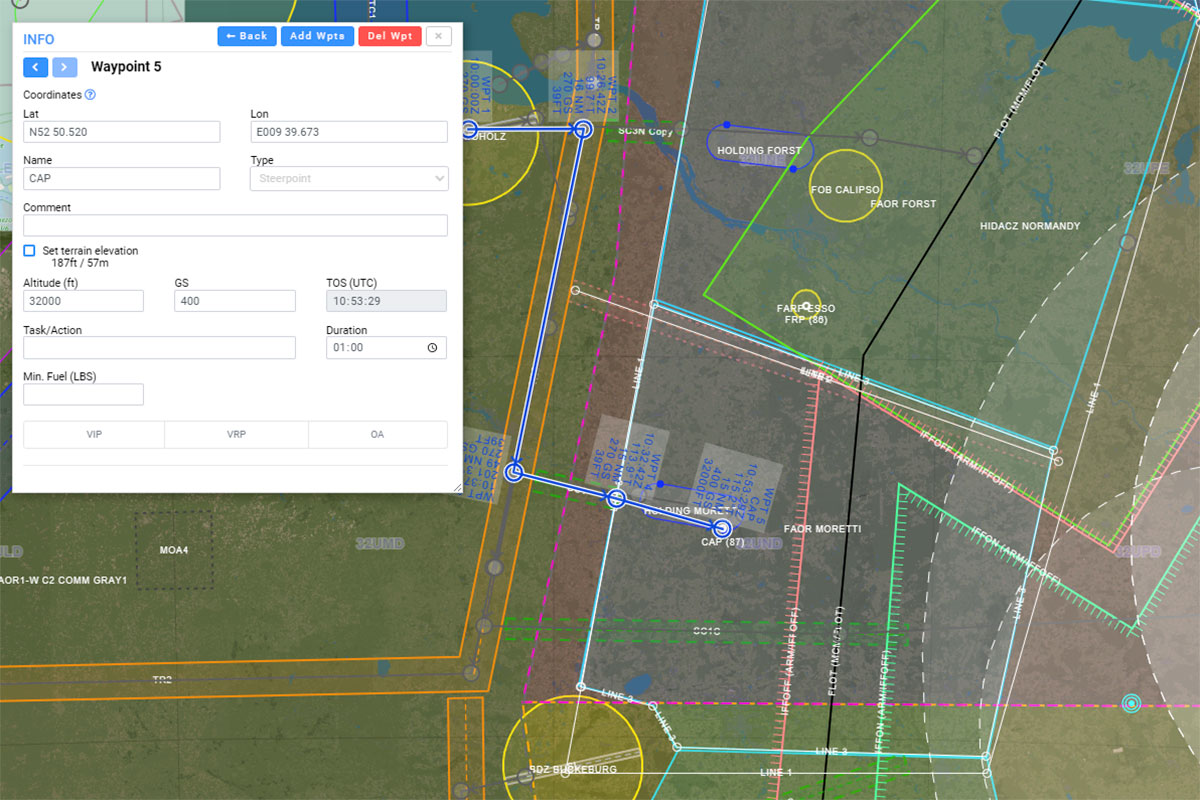
  • Build and edit the flight route with accurate steerpoint times, altitudes and navigation data
  • Configure VIP, VRP, OA and other navigation points
  • Prepare DCS World DTC data including flight plan, DTC points, DTC lines and threat circles, radio presets, CMDS presets and other module-specific DTC settings
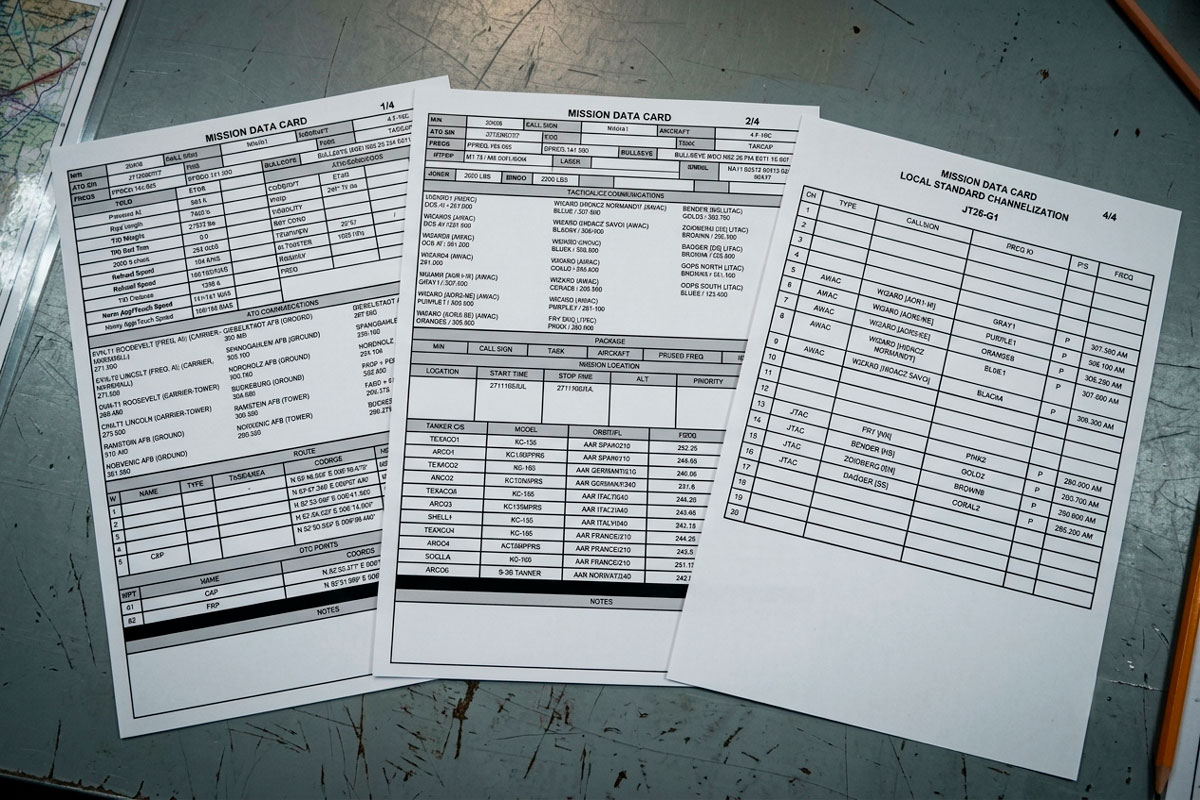
  • Generate printable Mission Data Cards (MDC) for cockpit use
  • Perform TOLD calculations and other flight-planning calculations
Tactical Analysis
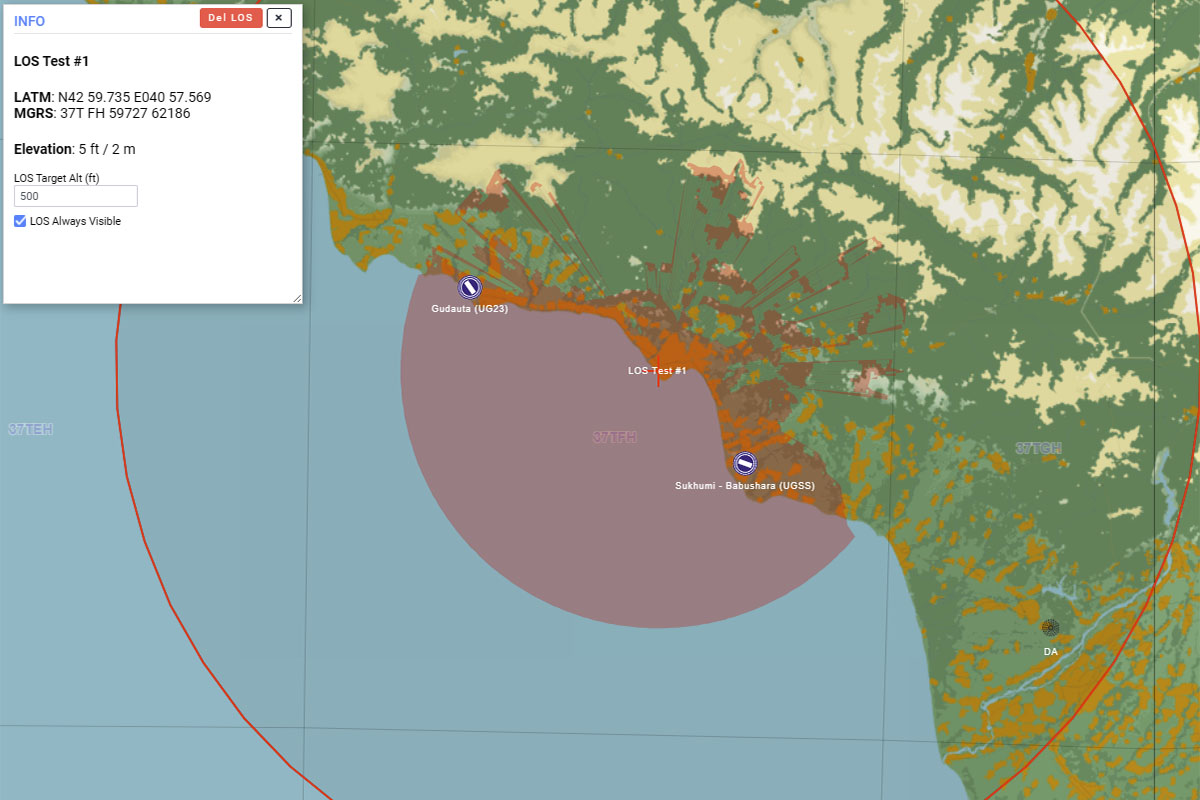
  • Analyze threats, targets, airspace and radar Line of Sight (LOS)
  • Use DCS World terrain and SRTM1 elevation data for simulator-consistent terrain analysis
  • Work with True or Magnetic references, including DCS World magnetic variation based on mission location and date
  • Use Lat/Lon and MGRS coordinates with multiple formats, grids and metric or imperial units
  • Define pilot-specific targets, mission points and navigation data
Cockpit Preparation
  • Generate printable Mission Data Cards (MDC) in A4 or A5 format
  • Prepare aircraft-specific DTC (Data Transfer Cartridge) data and export the resulting .dtc file for DCS World
  • Configure flight plan and supported aircraft navigation / radio data
Debriefing
  • Record mission outcomes and status
  • Add post-flight notes and observations
  • Keep debriefing information linked to the mission context
3. SHARED OPERATIONAL DATA
DCS AOC Tools
  • Receives the pilot's updated flight plan and mission data
  • Staff can review the pilot's planned route, timing and mission information
  • Keeps the operational plan synchronized with pilot planning
+
DCS Airspace
  • Controllers access shared flight, callsign and communication information
  • Pilot flight plans and operational context are available alongside the live tactical picture
  • Supports coordinated ATC, AWACS and GCI operations

DCS Mission Planner is your operational tool for translating strategic plans into concrete actions. It allows you to:

  • Visualize and Interact with Mission Data: It offers a graphical and tabular representation of data extracted from .miz files and refined within DCS AOC Tools, making complex information immediately understandable and actionable.
  • Customize and Optimize Flight Plans and DTC: Enables you to adapt flight plans, targets and DTC data to specific mission needs, overriding default .miz data with configurations set in DCS AOC Tools for maximum operational flexibility. Supported aircraft data—including flight plans, waypoints, radio presets and aircraft-specific DTC settings—can be exported as a standalone .dtc file for loading into DCS World's native Data Transfer Cartridge system.
  • Generate Mission Data Card: Automatically creates ready-to-use mission data cards (MDC) in A4 and A5 PDF, compiling information from both the .miz file, DCS AOC Tools and DCS Mission Planner inputs, reducing manual workload for pilots and planners.
  • Support Debriefing: Provides a framework to record and review mission outcomes, contributing to continuous learning and improvement based on actual mission data and operational inputs from DCS AOC Tools.

Main Features

DCS Mission Planner integrates several key functionalities to support the entire mission lifecycle:

  • DTC Editor & Data Transfer Cartridge: Prepare and edit aircraft-specific DTC data directly within DCS Mission Planner, including flight plans, DTC points, DTC lines, radio presets, CMDS presets, threat circles, and other supported aircraft-specific settings. Export the completed configuration as a standalone .dtc file for loading into DCS World's native Data Transfer Cartridge system.
  • Flight Planning: Build and customize DCS World flight routes with steerpoints, times, altitudes, navigation points, VIPs, VRPs, OAs and other mission-specific navigation data. Flight plan data can also be incorporated directly into the aircraft-specific DTC configuration.
  • Interactive Map: Plan and edit flights directly on DCS World theater maps, with flight routes, waypoints, bullseyes, units, targets, airspaces, and navigation points. Visual changes to flight plans are synchronized with the DCS AOC Tools project when working in an integrated workflow.
  • TOLD Data: Tool for calculating and managing takeoff and landing data specific to aircraft and conditions, which can be saved as part of your aircraft's DTC within DCS AOC Tools.
  • Comm Plan: Detailed management of radio frequencies for various communication types, with customization and saving options, all centrally managed within DCS AOC Tools.
  • Line of Sight (LOS) Analysis: Calculates line of sight from any unit, ground object, or custom point on the map. It allows users to set a specific target altitude and maximum desired range, utilizing highly accurate SRTM1 elevation data extracted directly from DCS World theaters for precise terrain masking and coverage evaluation.
  • Mission Data Card (MDC) Generation: Generate complete printable Mission Data Cards in A4 or A5 PDF format, combining mission, flight, navigation, communication and aircraft preparation data for cockpit use.
  • Mission Dashboard: Displays a summary of available missions, with filters for units and assignments, reflecting the structure defined in DCS AOC Tools.
  • Debriefing: Allows recording post-mission details, including outcomes, status, and descriptive notes, linking directly to the mission context established in DCS AOC Tools.
REALISM & DCS WORLD DATA ACCURACY
A shared technical foundation that gives pilots accurate DCS World terrain, navigation and environmental data for flight planning, route analysis and terrain-masking assessment.

DCS-NATIVE SRTM1 TERRAIN DATA

Uses high-fidelity SRTM1 elevation data from the actual DCS theater for route analysis, elevation assessment and flight planning, avoiding discrepancies caused by using only real-world terrain data.

REAL-TIME RADAR LOS

Provides radar line-of-sight information that can be used to assess threat exposure and plan routes around defended areas and radar coverage.

POINT-TO-POINT LOS ANALYSIS

Allows pilots to analyze line of sight between arbitrary points, including selected positions and altitudes, when preparing routes, ingress profiles and terrain-masking tactics.

TERRAIN MASKING ANALYSIS

Helps pilots study terrain masking and select flight profiles that use the actual DCS terrain to reduce exposure to radar and other threats.

MISSION-DATE MAGNETIC VARIATION

Provides mission-date magnetic variation for more accurate headings, bearings and navigation during flight planning.

NATIVE DCS MAPS

Lets pilots plan directly against DCS World theater references, reducing discrepancies between flight planning and the simulator.

CUSTOMIZABLE TACTICAL DISPLAY

Provides flexible control over map layers and visual references to keep routes, threats, terrain and flight-planning information clear during mission preparation.

UTM-CALIBRATED DATA

Maintains coordinate consistency between flight planning, map references and the DCS World environment.

Benefits for a Virtual Flight Group in DCS World

Using DCS Mission Planner offers numerous operational and organizational advantages:

  • Detailed Pre-Flight Planning: Access comprehensive information on airfields, waypoints, targets, and airspaces, all sourced from the .miz file and augmented by DCS AOC Tools, allowing for thorough preparation before each flight.
  • Accurate TOLD Calculations: Obtain precise takeoff and landing data (TOLD) specific to your aircraft and mission conditions, improving operational safety and efficiency.
  • On-The-Fly Communications Management: Easily configure and access communication plans (Comm Plan) for radio frequencies, ensuring fluid coordination with ATC, AWACS, and other flight elements, as defined and managed in DCS AOC Tools.
  • Enhanced Situational Awareness: The interactive map, displaying flight plans, units, targets, and airspaces, provides a clear view of the battlefield, integrating data from the .miz file with operational overlays from DCS AOC Tools.
  • Automated Documentation: PDF Data Card generation significantly reduces the time spent on manual briefing preparation, allowing pilots to focus on flying, with all data consistently pulled from the central DCS AOC Tools project.
  • Structured Debriefing: Record and analyze mission outcomes in a standardized format, facilitating the identification of strengths and areas for improvement, using the mission context established in DCS AOC Tools.

DCS Mission Planner is the essential tool for any virtual flight group seeking to operate in DCS World with maximum organization, efficiency, and a deeper, more rewarding simulation experience, by effectively visualizing and utilizing the comprehensive operational plans prepared using DCS AOC Tools.

Combined Ops and its tools (DCS AOC Tools, DCS Mission Planner and DCS Airspace) are developed and maintained solely and exclusively for DCS World as a platform for digital entertainment and flight simulation. Our operations are strictly non-commercial and non-military. Under no circumstances is our environment intended, nor should it be used, for commercial purposes, professional pilot training, or any military applications. We are a community of enthusiasts dedicated to the hobby of flight simulation, and all our activities are conducted purely for recreational and educational enjoyment within the gaming community.

Do you need more technical information?