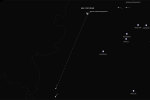
Upgraded the Measuring Tool to provide a smoother navigation experience and a more focused BRAA Mode for tactical intercepts.
The Measurement Tool BRAA Mode (ALT + CTRL) has been refined to restrict measurements to a single segment, preventing accidental multi-point lines and ensuring immediate bearing/range data. I have also updated map interactions to allow seamless panning while the ruler is active.
Changelog:
-
BRAA Mode Optimization: Measurements are now restricted to a single segment when ALT + CTRL is active.
-
Fluid Navigation: Enabled map panning while measuring (click-and-drag).
-
UI Stability: Right-click Context Menu is disabled during active measurements to avoid conflicts.
- Help Tooltip: Help Tooltip is now limited to normal Measurement Tool and is hidden when BRAA mode is active.